By using this site, you agree to the Privacy Policy and Terms of Use.
Accept
Blog MasterBlog MasterBlog Master
  • Home
  • Privacy Policy
  • Disclaimer
  • About Us
  • Contact Us
  • Business
  • Lifestyle
  • Technology
Search
  • Home
  • Privacy Policy
  • Disclaimer
  • About Us
  • Contact Us
  • Business
  • Lifestyle
  • Technology
© 2022 Foxiz News Network. Ruby Design Company. All Rights Reserved.
Reading: How to Start a Blog: A Practical Guide for Beginners
Share
Notification Show More
Font ResizerAa
Blog MasterBlog Master
Font ResizerAa
Search
  • Home
  • Privacy Policy
  • Disclaimer
  • About Us
  • Contact Us
  • Business
  • Lifestyle
  • Technology
Follow US
  • Home
  • Privacy Policy
  • Disclaimer
  • About Us
  • Contact Us
  • Business
  • Lifestyle
  • Technology
© 2022 Foxiz News Network. Ruby Design Company. All Rights Reserved.
Blog Master > Blog > How to Start a Blog: A Practical Guide for Beginners
Blog

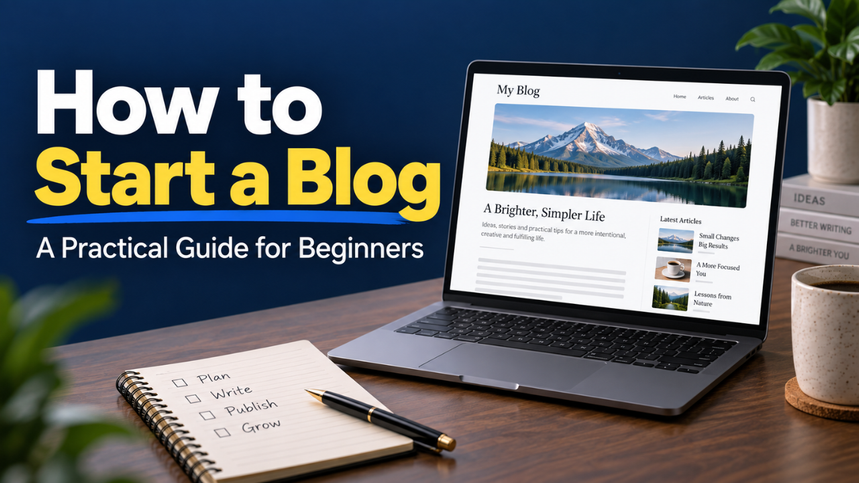
How to Start a Blog: A Practical Guide for Beginners

Blogmaster
Last updated: 2026/09/05 at 9:41 AM
Blogmaster
Share
You can spend weeks choosing a blog name and still have nothing for someone to read. It happens easily. One small decision leads to another, and suddenly you’re comparing fonts instead of building the blog you had in mind. Starting gets easier when you focus on a few useful decisions: who you want to help, what you’ll cover, and how you’ll get your first posts online. You don’t need a fancy website or a huge budget. You need a clear direction, a working home for your content, and enough patience to improve as you go. Table of Contents Pick a Topic With Room to Grow Decide Who You’re Helping Choose Your Platform and Set a Budget Find a Name and Set Up Your Website Make Your Blog Easy to Use Plan Your First Few Posts Help Readers Find Your Blog Build a Routine You Can Keep Think About Income Without Rushing It Launch Before Everything Feels Perfect Pick a Topic With Room to Grow A good blog topic sits between what interests you and what other people want help with. Interest keeps you going. Reader demand gives your work a purpose beyond filling pages. Start with something you know, enjoy exploring, or regularly explain to others. Maybe friends ask you about caring for indoor plants. Perhaps you’ve learned how to cook decent meals in a tiny kitchen. Both could become useful blogs. The trick is choosing a manageable starting point. “Food” leaves you competing for attention across a huge subject. “Easy meals for people cooking for one” gives you a clearer direction. Before committing, jot down fifteen possible post ideas. Look at questions people ask in relevant communities and search results. If you quickly find several useful angles, that’s encouraging. If every idea feels forced, adjust the topic before buying anything. Leave yourself some space to grow, too. A blog built around one specific appliance may feel restrictive later. Decide Who You’re Helping A topic tells you what the blog covers. An audience tells you how to make it useful. Take gardening. Someone with a large garden needs different advice from someone growing herbs on an apartment windowsill. Their space, budget, tools, and problems differ. Picture one reader and finish this sentence: “My blog helps ___ do ___.” For example, “My blog helps busy beginners grow food in small spaces.” That simple statement can guide your examples, post ideas, and tone. You’ll know whether a detailed guide to greenhouse heating belongs on your site or can wait. You don’t need to understand every reader from day one. Start with a sensible idea, then pay attention to the questions people actually ask. Those questions often reveal needs you hadn’t considered. Choose Your Platform and Set a Budget Your blogging platform is where you manage and publish content. Hosting stores your website’s files and makes them available online. A domain is the address people use to visit. You can use a hosted service that bundles much of the setup, or arrange hosting and install blogging software yourself. The better fit depends on how much control you want and how much maintenance you’re willing to handle. Self-hosted WordPress is one option. Its official getting started course explains the relationship between hosting, domains, and the site you’ll build. Before paying, check what a plan includes. Look at renewal costs, backup arrangements, support, and whether you can export your content if you leave. A cheap introductory offer tells you little about the cost of keeping the blog running. Set a first-year spending limit. Include the domain and hosting, then treat paid themes and extra tools as optional. You can make those decisions when you have a specific problem to solve. Find a Name and Set Up Your Website Choose a name that’s easy to say, spell, and remember. Tell someone the name aloud. If you need to explain three unusual spellings, keep looking. Avoid a name so narrow that it locks you into your first idea. “Small Space Harvest” leaves more room than a name tied to one herb. Check domain availability and search for existing businesses using similar names. Aim for something distinct that won’t confuse readers. Once you’ve chosen your platform, follow its setup instructions. On a self-hosted route, this usually means connecting your domain to your host, installing the software, and enabling HTTPS so visitors can use a secure connection. Use a strong, unique password and turn on two-factor authentication where available. Set up backups and learn how restoration works. It’s much easier to sort that out before you need it. Make Your Blog Easy to Use Your design has one main job: help people read and find things. Choose a simple theme with clear text, good contrast, and a layout that works on phones. Open a sample post on your own phone. Can you read it comfortably? Does the menu work? Is anything covering the content? Keep your main navigation short. Home, Blog, About, and Contact are enough for many new sites. Add categories when they help readers browse, rather than creating a dozen empty sections. Use the About page to explain who the blog serves and why you care about the topic. Give readers a working way to contact you. Your privacy information should reflect the tools and data collection your site actually uses. Avoid copying another site’s page without checking whether it describes yours. Skip decorative features that slow pages down or distract from the text. A clean, useful site can make a strong first impression. Plan Your First Few Posts You don’t need twenty articles ready before launch. A small set of useful posts gives visitors a reason to explore. Start with a beginner question, a common problem, and a practical walkthrough. For a small-space gardening blog, that might mean choosing herbs, understanding yellow leaves, and setting up a windowsill planter. Each post should have a clear purpose. Someone searching for “why does basil keep dying indoors?” wants likely causes and workable fixes. Give them those answers without making them sit through a long history of basil. Bring in details that help people act. Explain what you tried, where a step can go wrong, or what a beginner might overlook. Use your own photos when they clarify something, and get permission or a suitable license for other images. Before publishing, check facts, spelling, and links. Make sure the title matches what the page delivers. A specific, honest title builds better expectations than a dramatic promise you can’t support. Help Readers Find Your Blog Publishing is only part of getting a blog started. You also need to give people a way to discover it. Begin with basic search engine optimization, usually called SEO. Use a descriptive title, clear headings, and a short URL that reflects the subject. Link between related posts when the next page would help the reader. Google’s SEO starter guide explains these basics and how search engines discover content. Treat them as good housekeeping, not a promise of rankings. Set up Google Search Console to monitor search performance and identify indexing issues. You can submit your sitemap there, though submission doesn’t guarantee that every page will appear in search. Outside search, choose one place where your intended readers already spend time. Join conversations, answer questions, and share a relevant post when it’s welcome. Dropping links into unrelated discussions rarely gives people a reason to trust you. Build a Routine You Can Keep Let’s be honest: publishing every day sounds exciting until your normal responsibilities catch up with you. Choose a pace that fits your week. One useful post every week or two is a reasonable starting plan if you can maintain it. Keep a simple note of questions and ideas as they come up. That way, you won’t face an empty list whenever you’re ready to add something new. Make room to care for existing posts as well. Fix broken links, replace outdated details, and expand explanations when readers point out something confusing. Review progress every month or so. Look at which pages attract readers, what search terms bring visits, and whether anyone contacts you or returns. Early numbers may be small. Use them as clues about what to improve, without treating every quiet week as a verdict on the whole project. Think About Income Without Rushing It A blog can earn through services, affiliate links, digital products, sponsorships, or advertising. Which approach fits depends on what your readers need and what you can responsibly offer. A photography blog might lead to paid sessions. A practical spreadsheet blog could sell a useful template. Advertising depends partly on traffic, while a service inquiry can come from a much smaller audience. None of these routes guarantees income. Start by making the blog useful enough that people have a reason to return. If you later recommend paid products, explain relevant limitations and make commercial relationships clear. Keep your early spending comfortable even if the blog earns nothing. Financial pressure can push you toward shortcuts that weaken the reader’s experience. Launch Before Everything Feels Perfect Before sharing the site, check the basics: your posts open, the mobile layout works, links lead to the right places, and the contact method reaches you. Then let people see it. You’ll learn things from a live blog that endless planning can’t reveal. A question you thought was minor may attract the most interest. A reader may need an example you hadn’t thought to include. Learning how to start a blog comes down to making a useful beginning and paying attention afterward. Choose your reader, publish something that helps them, and leave yourself room to improve. Meta description: Learn how to start a blog, choose your niche, set up your website, publish useful posts, and attract readers steadily.
SHARE

You can spend weeks choosing a blog name and still have nothing for someone to read. It happens easily. One small decision leads to another, and suddenly you’re comparing fonts instead of building the blog you had in mind.

Contents
Table of ContentsPick a Topic With Room to GrowDecide Who You’re HelpingChoose Your Platform and Set a BudgetFind a Name and Set Up Your WebsiteMake Your Blog Easy to UsePlan Your First Few PostsHelp Readers Find Your BlogBuild a Routine You Can KeepThink About Income Without Rushing ItLaunch Before Everything Feels Perfect

Starting gets easier when you focus on a few useful decisions: who you want to help, what you’ll cover, and how you’ll get your first posts online.

You don’t need a fancy website or a huge budget. You need a clear direction, a working home for your content, and enough patience to improve as you go.

Table of Contents

  • Pick a Topic With Room to Grow
  • Decide Who You’re Helping
  • Choose Your Platform and Set a Budget
  • Find a Name and Set Up Your Website
  • Make Your Blog Easy to Use
  • Plan Your First Few Posts
  • Help Readers Find Your Blog
  • Build a Routine You Can Keep
  • Think About Income Without Rushing It
  • Launch Before Everything Feels Perfect

Pick a Topic With Room to Grow

A good blog topic sits between what interests you and what other people want help with. Interest keeps you going. Reader demand gives your work a purpose beyond filling pages.

Start with something you know, enjoy exploring, or regularly explain to others. Maybe friends ask you about caring for indoor plants. Perhaps you’ve learned how to cook decent meals in a tiny kitchen.

Both could become useful blogs.

The trick is choosing a manageable starting point. “Food” leaves you competing for attention across a huge subject. “Easy meals for people cooking for one” gives you a clearer direction.

Before committing, jot down fifteen possible post ideas. Look at questions people ask in relevant communities and search results. If you quickly find several useful angles, that’s encouraging. If every idea feels forced, adjust the topic before buying anything.

Leave yourself some space to grow, too. A blog built around one specific appliance may feel restrictive later.

Decide Who You’re Helping

A topic tells you what the blog covers. An audience tells you how to make it useful.

Take gardening. Someone with a large garden needs different advice from someone growing herbs on an apartment windowsill. Their space, budget, tools, and problems differ.

Picture one reader and finish this sentence: “My blog helps ___ do ___.”

For example, “My blog helps busy beginners grow food in small spaces.”

That simple statement can guide your examples, post ideas, and tone. You’ll know whether a detailed guide to greenhouse heating belongs on your site or can wait.

You don’t need to understand every reader from day one. Start with a sensible idea, then pay attention to the questions people actually ask. Those questions often reveal needs you hadn’t considered.

Choose Your Platform and Set a Budget

Your blogging platform is where you manage and publish content. Hosting stores your website’s files and makes them available online. A domain is the address people use to visit.

You can use a hosted service that bundles much of the setup, or arrange hosting and install blogging software yourself. The better fit depends on how much control you want and how much maintenance you’re willing to handle.

Self-hosted WordPress is one option. Its official getting started course explains the relationship between hosting, domains, and the site you’ll build.

Before paying, check what a plan includes. Look at renewal costs, backup arrangements, support, and whether you can export your content if you leave. A cheap introductory offer tells you little about the cost of keeping the blog running.

Set a first-year spending limit. Include the domain and hosting, then treat paid themes and extra tools as optional. You can make those decisions when you have a specific problem to solve.

Find a Name and Set Up Your Website

Choose a name that’s easy to say, spell, and remember. Tell someone the name aloud. If you need to explain three unusual spellings, keep looking.

Avoid a name so narrow that it locks you into your first idea. “Small Space Harvest” leaves more room than a name tied to one herb.

Check domain availability and search for existing businesses using similar names. Aim for something distinct that won’t confuse readers.

Once you’ve chosen your platform, follow its setup instructions. On a self-hosted route, this usually means connecting your domain to your host, installing the software, and enabling HTTPS so visitors can use a secure connection.

Use a strong, unique password and turn on two-factor authentication where available. Set up backups and learn how restoration works. It’s much easier to sort that out before you need it.

Make Your Blog Easy to Use

Your design has one main job: help people read and find things.

Choose a simple theme with clear text, good contrast, and a layout that works on phones. Open a sample post on your own phone. Can you read it comfortably? Does the menu work? Is anything covering the content?

Keep your main navigation short. Home, Blog, About, and Contact are enough for many new sites. Add categories when they help readers browse, rather than creating a dozen empty sections.

Use the About page to explain who the blog serves and why you care about the topic. Give readers a working way to contact you.

Your privacy information should reflect the tools and data collection your site actually uses. Avoid copying another site’s page without checking whether it describes yours.

Skip decorative features that slow pages down or distract from the text. A clean, useful site can make a strong first impression.

Plan Your First Few Posts

You don’t need twenty articles ready before launch. A small set of useful posts gives visitors a reason to explore.

Start with a beginner question, a common problem, and a practical walkthrough. For a small-space gardening blog, that might mean choosing herbs, understanding yellow leaves, and setting up a windowsill planter.

Each post should have a clear purpose. Someone searching for “why does basil keep dying indoors?” wants likely causes and workable fixes. Give them those answers without making them sit through a long history of basil.

Bring in details that help people act. Explain what you tried, where a step can go wrong, or what a beginner might overlook. Use your own photos when they clarify something, and get permission or a suitable license for other images.

Before publishing, check facts, spelling, and links. Make sure the title matches what the page delivers. A specific, honest title builds better expectations than a dramatic promise you can’t support.

Help Readers Find Your Blog

Publishing is only part of getting a blog started. You also need to give people a way to discover it.

Begin with basic search engine optimization, usually called SEO. Use a descriptive title, clear headings, and a short URL that reflects the subject. Link between related posts when the next page would help the reader.

Google’s SEO starter guide explains these basics and how search engines discover content. Treat them as good housekeeping, not a promise of rankings.

Set up Google Search Console to monitor search performance and identify indexing issues. You can submit your sitemap there, though submission doesn’t guarantee that every page will appear in search.

Outside search, choose one place where your intended readers already spend time. Join conversations, answer questions, and share a relevant post when it’s welcome. Dropping links into unrelated discussions rarely gives people a reason to trust you.

Build a Routine You Can Keep

Let’s be honest: publishing every day sounds exciting until your normal responsibilities catch up with you.

Choose a pace that fits your week. One useful post every week or two is a reasonable starting plan if you can maintain it.

Keep a simple note of questions and ideas as they come up. That way, you won’t face an empty list whenever you’re ready to add something new.

Make room to care for existing posts as well. Fix broken links, replace outdated details, and expand explanations when readers point out something confusing.

Review progress every month or so. Look at which pages attract readers, what search terms bring visits, and whether anyone contacts you or returns. Early numbers may be small. Use them as clues about what to improve, without treating every quiet week as a verdict on the whole project.

Think About Income Without Rushing It

A blog can earn through services, affiliate links, digital products, sponsorships, or advertising. Which approach fits depends on what your readers need and what you can responsibly offer.

A photography blog might lead to paid sessions. A practical spreadsheet blog could sell a useful template. Advertising depends partly on traffic, while a service inquiry can come from a much smaller audience.

None of these routes guarantees income.

Start by making the blog useful enough that people have a reason to return. If you later recommend paid products, explain relevant limitations and make commercial relationships clear.

Keep your early spending comfortable even if the blog earns nothing. Financial pressure can push you toward shortcuts that weaken the reader’s experience.

Launch Before Everything Feels Perfect

Before sharing the site, check the basics: your posts open, the mobile layout works, links lead to the right places, and the contact method reaches you.

Then let people see it.

You’ll learn things from a live blog that endless planning can’t reveal. A question you thought was minor may attract the most interest. A reader may need an example you hadn’t thought to include.

Learning how to start a blog comes down to making a useful beginning and paying attention afterward. Choose your reader, publish something that helps them, and leave yourself room to improve.

Meta description: Learn how to start a blog, choose your niche, set up your website, publish useful posts, and attract readers steadily.


You Might Also Like

QuikConsole Com Review: What the Website Actually Offers

Affiliate Marketing for Bloggers: Build Income Without Losing Trust

Blog Categories vs Tags: How to Organize Your Blog

How to Create a Blog Editorial Calendar That Works

Successful Blogging Tips to Build a Blog People Return To

Sign Up For Daily Newsletter

Be keep up! Get the latest breaking news delivered straight to your inbox.
[mc4wp_form]
By signing up, you agree to our Terms of Use and acknowledge the data practices in our Privacy Policy. You may unsubscribe at any time.
Share This Article
Facebook Twitter Copy Link Print
Share
Previous Article Successful Blogging Tips Successful Blogging Tips to Build a Blog People Return To
Next Article Christine Rodstrom Christine Rodstrom: Her Life and Marriage to Pat Riley
Leave a comment

Leave a Reply Cancel reply

Your email address will not be published. Required fields are marked *

Stay Connected

248.1k Like
69.1k Follow
134k Pin
54.3k Follow
banner banner
Create an Amazing Newspaper
Discover thousands of options, easy to customize layouts, one-click to import demo and much more.
Learn More

Latest News

thetanel.co.uk
thetanel.co.uk: What the Website Covers and How to Explore It
Travel
Bella Thornton Disability
Bella Thornton Disability: What Is Publicly Confirmed?
Lifestyle
QuikConsole Com Review
QuikConsole Com Review: What the Website Actually Offers
Blog
Gening AI
Gening AI: A Practical Guide to Its Chat, Roleplay, and Image Tools
Technology

You Might also Like

QuikConsole Com Review
Blog

QuikConsole Com Review: What the Website Actually Offers

Blogmaster Blogmaster 11 Min Read
Affiliate Marketing for Bloggers
Blog

Affiliate Marketing for Bloggers: Build Income Without Losing Trust

Blogmaster Blogmaster 12 Min Read
Blog Categories vs Tags
Blog

Blog Categories vs Tags: How to Organize Your Blog

Blogmaster Blogmaster 12 Min Read
Blog MasterBlog Master
Follow US
© 2026 BlogMaster.co.uk. All Rights Reserved.
Join Us!

Subscribe to our newsletter and never miss our latest news, podcasts etc..

[mc4wp_form]
Zero spam, Unsubscribe at any time.
Welcome Back!

Sign in to your account

Lost your password?